OmniStudio Document Generation: Limitations and When to Use a Third-Party App
09 Sep 2026
Table of Contents
OmniStudio document generation lets Salesforce teams create documents from Word or PowerPoint templates using data sourced through Data Mappers or Integration Procedures, typically triggered from an OmniScript. It is a capable tool inside Industries Cloud orgs where OmniStudio developers are already involved. For teams that need admin-led, no-code document generation across any Salesforce edition, 360 InstantDocs is a faster, simpler path to the same outcome.
Salesforce gives you more than one way to generate a document. That is not a problem in itself. The problem is that two tools doing similar things at the surface level can have completely different setup requirements, maintenance costs, and long-term operational realities depending on the org they live in and the team maintaining them.
Ready to see how 360 InstantDocs fits your Salesforce org?
OmniStudio DocGen and 360 InstantDocs both produce formatted documents from Salesforce data. That is roughly where the overlap ends. One is a component inside a broader Vlocity-origin framework built for Industries orgs with dedicated developer bandwidth. The other is a standalone AppExchange app designed for admins, RevOps teams, and operations managers who need quotes, contracts, and invoices produced from Salesforce records without writing a single line of code.
If you are evaluating both for your org, the choice usually comes down to what licenses you already have, who will own template maintenance, and how much of your document generation touches an OmniScript journey versus a standard Salesforce object.
What Is OmniStudio Document Generation?
OmniStudio Document Generation is a capability within Salesforce's OmniStudio suite, which originated from Vlocity and is now embedded in Industries Cloud. It generates documents from templates, most commonly Word or PowerPoint files, by pulling data through OmniStudio components rather than directly from Salesforce fields.
The core components involved in a typical setup are:
Templates are the Word or PowerPoint files where tokens replace live field values. Tokens follow a structured OmniStudio syntax and must be mapped precisely to the data sources powering them.
Data Mappers or Integration Procedures handle the data layer. Instead of pulling field values directly from a Salesforce record, OmniStudio DocGen retrieves data through these intermediary components. That adds flexibility for complex data transformations but also adds setup time.
OmniScript integration is usually how document generation gets triggered. A user moving through a guided process in an OmniScript reaches a step where the document is produced. Client-side generation happens in the browser, using data already loaded into the OmniScript context. Server-side generation (also called DocGen on the server) processes the document externally, which is required for more complex templates, larger outputs, or specific PDF formatting needs.
The distinction between client-side and server-side generation matters more than it appears. Server-side generation requires additional Salesforce configuration, specific permission sets, and in some orgs, an external DocGen service setup. Client-side generation is faster to configure but has limitations with template complexity and output fidelity.
Licensing and Setup Requirements
This is where many teams discover OmniStudio DocGen is not as accessible as it initially appears.
OmniStudio is included in several Salesforce Industries Cloud editions: Health Cloud, Financial Services Cloud, Communications Cloud, Energy and Utilities Cloud, and a handful of others. If your org runs on one of these, OmniStudio components may already be available. For standard Sales Cloud, Service Cloud, or Platform orgs, OmniStudio requires a separate license purchase.
Even with the right license, activating document generation is not a point-and-click process. Teams need to assign the correct permission sets to users, configure the DocGen settings in Setup, and in the case of server-side generation, connect to Salesforce's external DocGen service. Per Salesforce Help documentation, server-side DocGen setup includes enabling the feature at the org level, assigning specific permission sets, and ensuring the connected service is correctly provisioned.
For most orgs that do not already have Industries Cloud licenses, that licensing and setup overhead is a meaningful cost and time investment before the first document is produced.
Where OmniStudio DocGen Works Well
OmniStudio DocGen fits a specific profile well, and when that profile matches, it is a genuinely strong option.
Guided journey workflows. If document generation is one step inside a longer OmniScript flow, such as a guided enrollment, intake, or onboarding process, triggering DocGen from within that journey is a natural fit. The data is already loaded in the OmniScript context, so the document generation step does not require a separate record lookup.
Complex Industries data models. Health Cloud, Financial Services Cloud, and similar platforms often involve deeply relational data structures that standard Salesforce relationships do not expose cleanly. OmniStudio's Integration Procedures can reach across those structures more flexibly than standard field references. For teams already using those components to power other parts of their org, adding document generation to the same framework is a reasonable extension.
Orgs with dedicated OmniStudio developers. This matters. OmniStudio DocGen rewards teams that already have developers maintaining Data Mappers, Integration Procedures, and OmniScripts. If those skills exist in-house, adding document generation to the OmniStudio layer is an incremental effort rather than a new learning curve.
Want to skip the developer queue for your document generation?
Where Teams Run into Friction
OmniStudio DocGen creates real operational challenges for teams outside the Industries Cloud context, and sometimes within it.
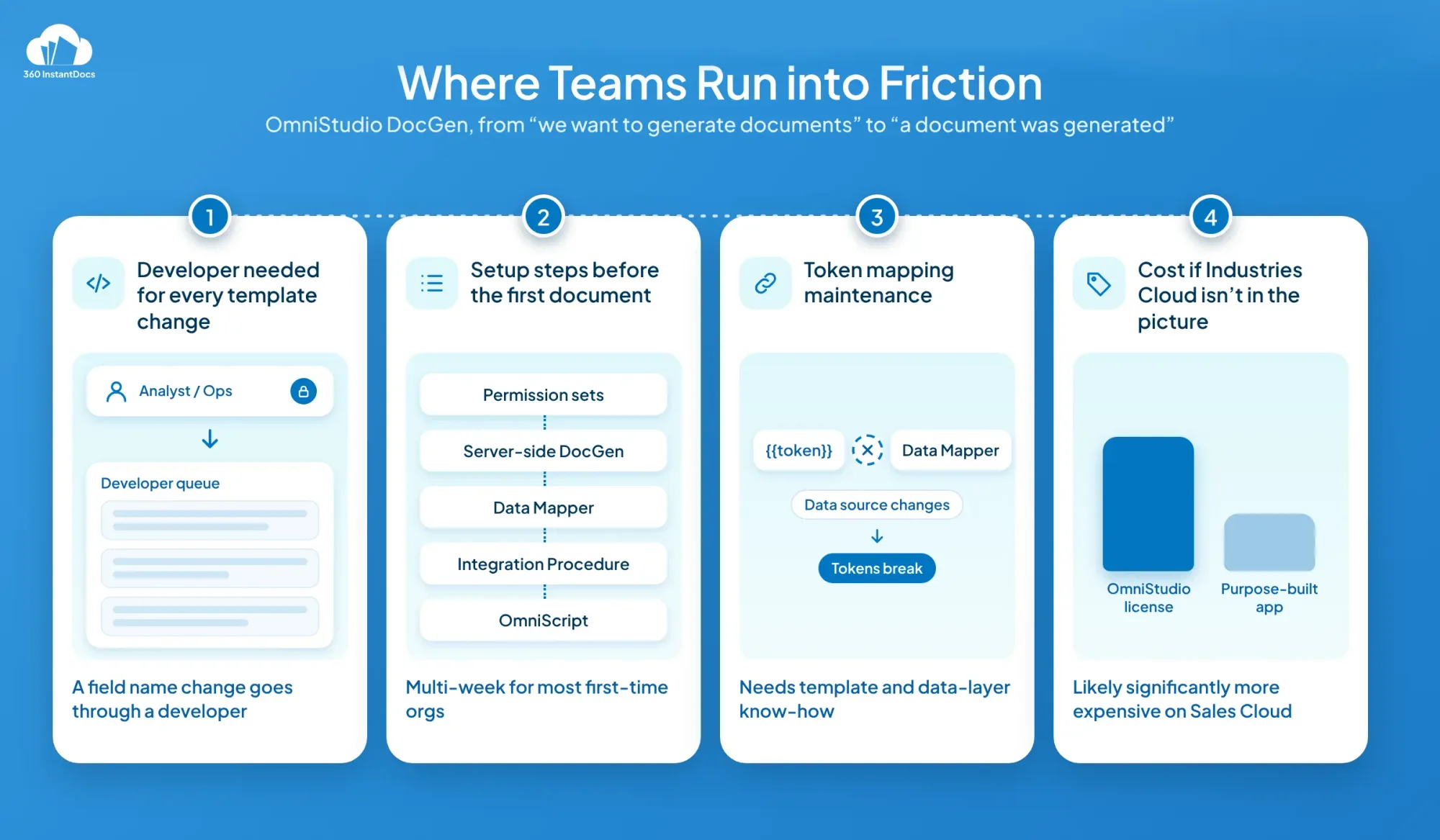
Developer dependency on every template change. Token syntax in OmniStudio templates is not something a business analyst or operations manager can maintain independently. When a field name changes in Salesforce, or the sales team wants a different line item calculation in the quote template, the update typically goes through a developer. That creates a backlog that slows down the kind of day-to-day template iteration that document workflows require.
Setup steps before the first document exists. Between permission set configuration, server-side DocGen provisioning, Data Mapper creation, Integration Procedure setup, and OmniScript integration, the path from "we want to generate documents" to "a document was generated" is multi-week in most orgs that are setting this up for the first time.
Token mapping maintenance. OmniStudio templates use a specific token format that must be aligned precisely with the data returned by the backing Data Mapper or Integration Procedure. When underlying data sources change, those tokens break. Finding and fixing them requires someone who understands both the template layer and the data layer simultaneously.
Cost if Industries Cloud is not already in the picture. For an org on standard Sales Cloud that wants to generate quotes and invoices, purchasing an OmniStudio license to access document generation is likely to be significantly more expensive than a purpose-built document generation app.
OmniStudio Document Generation vs 360 InstantDocs
| Criteria | OmniStudio DocGen | 360 InstantDocs |
|---|---|---|
| Required license | Industries Cloud or OmniStudio add-on | AppExchange app ($7/user/month) |
| Who builds templates | OmniStudio developer | Admin or business user |
| Template tool | Word / PowerPoint (token syntax) | Microsoft Word add-in (merge fields) |
| Data mapping | Data Mapper / Integration Procedure | Direct Salesforce field mapping |
| Salesforce Flow support | Triggered via OmniScript | Native Flow trigger |
| Bulk generation | Limited | Yes, from list views and reports |
| Time to first document | Weeks (licensing, setup, development) | Minutes (install, map, generate) |
| Pricing model | Included in Industries license or add-on | Per user, per month |
The comparison is not about which tool is better in absolute terms. It is about which one fits the org's existing investment, team skills, and document workflow requirements.
When to Use Each
Use OmniStudio DocGen when:
Your org runs on Health Cloud, Financial Services Cloud, or another Industries platform, and document generation is one step inside an OmniScript journey rather than a standalone business operation. You have an OmniStudio developer maintaining the data layer, and the document generation requirement is tied to the same data structures already powering your Integration Procedures.
You are building a guided patient intake or financial onboarding workflow where the document is part of a larger multi-step process, and the data complexity justifies using the full OmniStudio stack.
Use 360 InstantDocs when:
Your Salesforce org runs on Sales Cloud, Service Cloud, or any edition without Industries Cloud, and your team needs to generate quotes, invoices, NDAs, offer letters, or contracts from standard or custom Salesforce objects. The admin or operations team owns template maintenance, and waiting on a developer for every field-label update is not a realistic workflow.
You need to generate documents at scale across hundreds of records from a list view or Salesforce report, with output delivered directly to Salesforce Files or synced to SharePoint, Google Drive, or OneDrive.
Hybrid scenario: Some orgs use both tools in the same org for different workflows. OmniStudio DocGen handles the guided onboarding or enrollment journey inside Health Cloud, where the document is one step in a complex multi-screen OmniScript. 360 InstantDocs handles the ongoing commercial document layer: proposals, renewal quotes, service agreements, and invoices that operations or sales teams generate independently from Salesforce records throughout the customer lifecycle. In that model, each tool does what it was built for, and neither one is stretched into territory where it creates maintenance friction.
The Practical Question Is Who Owns Maintenance
Most document generation decisions look like a capability comparison. The more accurate question is: six months after deployment, who is maintaining these templates when fields change?
If the answer has to be a developer, that shapes the realistic cost and speed of every document update from that point forward. If the answer can be the admin or the RevOps manager who owns the Salesforce configuration anyway, that changes the operational picture entirely.
360 InstantDocs was built for the second scenario. The Microsoft Word add-in maps merge fields directly to Salesforce data without JSON token syntax or Integration Procedure dependencies. When a field label changes or a new approval clause needs to be added to the contract template, the person who made the Salesforce configuration change can make the template update in the same session, with no handoff required.
For teams on Industries Cloud with existing OmniStudio skills, OmniStudio document generation is a logical extension of an existing investment. For the broader Salesforce market running on standard editions, 360 InstantDocs covers the full document generation requirement without the license overhead or developer dependency.


Solve It with Salesforce. We’ll Show You How.
AI. Apps. Experts. Everything you need to win with Salesforce under one roof.Frequently Asked Questions
What is OmniStudio Document Generation in Salesforce?
OmniStudio document generation is a feature within Salesforce's OmniStudio suite that creates formatted Word or PowerPoint documents from Salesforce data. It uses Data Mappers or Integration Procedures to retrieve data and is typically triggered from within an OmniScript guided journey. It is primarily used in Industries Cloud orgs such as Health Cloud, Financial Services Cloud, and Communications Cloud, where OmniStudio components already power key workflows.
Do I need an OmniStudio license to use Document Generation?
Yes. Salesforce OmniStudio document generation requires either an Industries Cloud license that includes OmniStudio (such as Health Cloud or Financial Services Cloud) or a separate OmniStudio license add-on. Orgs running on standard Sales Cloud or Service Cloud editions do not include OmniStudio by default. If your document generation needs are not tied to Industries Cloud workflows, a purpose-built AppExchange app such as 360 InstantDocs is typically a more practical and cost-effective option.
Does OmniStudio Document Generation support PDF output?
Yes, OmniStudio DocGen can produce PDF output, particularly through server-side generation, which renders the final document externally before delivering it to the user. Client-side generation has more limited formatting control and may not produce the same PDF fidelity as server-side processing. The setup required for server-side PDF generation is more involved and typically requires developer configuration of the external DocGen service.
What is the difference between client-side and server-side document generation?
In document generation, client-side processing happens in the user's browser using data already loaded into the OmniScript session. It is faster to configure but has limitations with template complexity and PDF output quality. Server-side generation processes the document on Salesforce's external DocGen service, which supports more complex templates and better output fidelity. Server-side generation requires additional permission sets, org-level feature activation, and service provisioning before it can be used.
Can admins build OmniStudio document templates without a developer?
In practice, it is difficult. OmniStudio templates use a specific token syntax that must align with the data structure returned by a backing Data Mapper or Integration Procedure. Building those data components requires OmniStudio development knowledge. While the Word template itself can be edited by a non-developer, the underlying data mapping configuration that makes those tokens resolve correctly typically requires someone familiar with the OmniStudio data layer. For admin-managed template workflows, 360 InstantDocs is designed specifically for that use case.
Can I use 360 InstantDocs and OmniStudio in the same org?
Yes. Both tools can operate in the same Salesforce org without conflict. A common approach is to use OmniStudio document generation for guided journey workflows inside Industries Cloud, where documents are part of a structured OmniScript process, and use 360 InstantDocs for standalone commercial document workflows such as proposals, invoices, and contracts that sales or operations teams generate independently from Salesforce records throughout the customer lifecycle.

About the author
Editorial TeamSalesforce specialists and B2B writers at 360 Degree Cloud sharing practical guides on document generation and automation in Salesforce.
Recent Blogs
Visualforce PDF Alternative: Generate Salesforce PDFs Without Maintaining Apex Code
Tired of maintaining Apex and Visualforce for PDFs? See the hidden costs, compare the alternatives, and learn how to replace Visualforce PDF with Word templates.
Read More: Visualforce PDF Alternative: Generate Salesforce PDFs Without Maintaining Apex Code
Nintex DocGen Alternative for Salesforce: A Lighter, Faster Option for Mid-Market Teams
Looking for a Nintex DocGen alternative? Compare Nintex DocGen vs 360 InstantDocs on price, setup, Flow, and bulk generation, plus how to switch.
Read More: Nintex DocGen Alternative for Salesforce: A Lighter, Faster Option for Mid-Market Teams
Salesforce Flow to Generate PDF: Native Options vs a Document Generation App
Can Salesforce Flow generate a PDF? Compare Visualforce, Apex and native document tools with a no-code document generation app, and pick the right fit.
Read More: Salesforce Flow to Generate PDF: Native Options vs a Document Generation AppReady to Make the Most Out of Your Salesforce Instance?
Our Salesforce aces would be happy to help you. Just drop us a line at contact@360instantdocs.com, and we’ll take it from there!

Resources
Guides, customer stories and how-tos from the 360 InstantDocs team.